Thursday, March 5, 2015

MS CRM 2011 KB Article customization Issue.

Recently I have encountered some issue while customizing Kb Article Entity. I was doing following configuration in Article form.

1. Add Base Templet lookup to the form
2. Add status picklist to the form

What I notice while adding above fields to the form was that these fields became required and locked on the form.
Then what happened was, while creating new Article my ribbon was not loading.
We have tried to debug the JS and found that it’s breaking in below highlighted point. So I knew that something is wrong with the Base Template field which I added earlier.
n addition to that we have noticed that Submit, Approve,.. buttons were disabled on the form.
But it’s enabled in the main grid.
We knew that something was wrong with the fields we added to the Form, but now we cannot remove these two fields from the form as it became locked in the form, we consult Microsoft on this as it seems to be a product bug.

Then the Microsoft advise us to remove it manually form the customization xml. We followed the below steps then everything seems to be fine.

 • Create a New Solutions with Kb Article entity
 • Export the solutions as a unmanage and open customisation.xml
 • Edited the customization.xml and commented the control for kbarticletemplateid and statecode.
 • Saved the customization.xml file and zipped the solution.
 • Imported the solution back to the system.
 • Published the customization and issue was resolved by that.

Sunday, February 16, 2014

HOW TO: Use ASP to Force SSL for Specific Pages

Forcing ASP page to use https can be done in couple of ways, here I’m sharing how we can do this using ASP.net code itself, rather than configuring IIS. Step 1: Create INC file with following code
<%
if(Request.ServerVariables["SERVER_PORT"]== "80")
            {
                string strSecureURL;
                strSecureURL = "https://";
                strSecureURL = strSecureURL + Request.ServerVariables["SERVER_NAME"];
                strSecureURL = strSecureURL + Request.ServerVariables["URL"];
                Response.Redirect(strSecureURL);
            }
%>
Then save it as “ForceSSL.inc” in web application root directory. Step 2: Add reference to INC file by adding below line:

Note: If you are using Master page, then you have to add this code inside


Step 3: Add https as new binding in IIS.
Reference: http://support.microsoft.com/kb/239875

Wednesday, December 11, 2013

How To Obtain The Size Of All Tables In A SQL Server Database

SET NOCOUNT ON 

DBCC UPDATEUSAGE(0) 

-- DB size.
EXEC sp_spaceused

-- Table row counts and sizes.
CREATE TABLE #t 
( 
    [name] NVARCHAR(128),
    [rows] CHAR(11),
    reserved VARCHAR(18), 
    data VARCHAR(18), 
    index_size VARCHAR(18),
    unused VARCHAR(18)
) 

INSERT #t EXEC sp_msForEachTable 'EXEC sp_spaceused ''?''' 

SELECT *
FROM   #t

-- # of rows.
SELECT SUM(CAST([rows] AS int)) AS [rows]
FROM   #t
 
DROP TABLE #t

Reference : http://therightstuff.de/CommentView,guid,df930155-f60f-4f56-ab33-f1352ff091a1.aspx

Tuesday, August 13, 2013

CRM 2011: How to read Web resource from code

Following code snippet will help you to read content of the web resource.
/// 
/// Reads the CRM Web Resource by its unique name as a string
/// 

        public string ReadContent(string resourceName)
        {
            byte[] byteArray = ReadBytes(resourceName);
            if (byteArray != null)
            {
                return System.Text.Encoding.UTF8.GetString(byteArray);
            }
            
            return string.Empty;            
        }

/// 
/// Reads the CRM Web Resource by its unique name as a byte array
///         
        public byte[] ReadBytes(string resourceName)
        {
            try
            {
                WebResource webResource = new WebResource();

                QueryExpression query = new QueryExpression()
                {
                    EntityName = "webresource",
                    ColumnSet = new ColumnSet("content"),
                    Criteria = new FilterExpression
                    {
                        FilterOperator = LogicalOperator.And,
                        Conditions = 
                        {
                            new ConditionExpression{AttributeName = "name", Operator = ConditionOperator.Equal, Values = { resourceName }}
                        }
                    }
                };

                RetrieveMultipleRequest retrieveMultipleRequest = new RetrieveMultipleRequest { Query = query };

                RetrieveMultipleResponse retrieveMultipleResponse = (RetrieveMultipleResponse)service.Execute(retrieveMultipleRequest);

                if (retrieveMultipleResponse != null && retrieveMultipleResponse.EntityCollection != null && retrieveMultipleResponse.EntityCollection.Entities.Count > 0)
                {
                    webResource = (WebResource)retrieveMultipleResponse.EntityCollection.Entities[0];

                    byte[] byteArray = Convert.FromBase64String(webResource.Content);

                    return byteArray;
                }

            }
            catch (Exception exception)
            {
                
            }

            return null;
        }

Wednesday, July 31, 2013

CRM 2011 Views – Retrieve more than 5000 records

As you probably know, by default CRM view retrieve only 5000 records for the view, to retrieve more than 5000 records we can use following method, Note that this is an unsupported change. This will applied to all Organizations in the CRM.

Database: MSCRM_CONFIG
IntColumn Value: Set to -1,

This will retrieve all records in the table.
UPDATE DeploymentProperties
SET IntColumn = '-1'
WHERE ColumnName = 'TotalRecordCountLimit'
After executing this query give a IIS Reset.

There is another way to change the registry value, But it will only applied to fetch XML, after you changed registry value still you receive only 5000 record in Entity grid. http://www.interactivewebs.com/blog/index.php/server-tips/turn-off-microsoft-crm-2011-5000-limit-on-data-retrieval-via-sdk/

Tuesday, July 30, 2013

NRIC(Singapore) Validation using Javascript

function IsValidNRIC(theNric) {
    var nric = [];
    nric.multiples = [2, 7, 6, 5, 4, 3, 2];

    if (theNric.length != 9) {
        alert('Invalid NRIC')
        return false;
    }

    var total = 0, count = 0, numericNric;
    var first = theNric.charAt(0), last = theNric.charAt(theNric.length - 1);

    if (first != 'S' && first != 's') {
        alert('Invalid NRIC S');
        return false;
    }
    /*Above is working*/

    numericNric = theNric.substr(1, theNric.length - 2);

    if (isNaN(numericNric)) {
        alert('Invalid NRIC Middle Not a number')
        return false
    }

    if (numericNric != null) {
        while (numericNric != 0) {
            total += (numericNric % 10) * nric.multiples[nric.multiples.length - (1 + count++)];
            numericNric /= 10;
            numericNric = Math.floor(numericNric);
        }
    }

    var outputs;
    if (first == 'S') {
        outputs = ['J', 'Z', 'I', 'H', 'G', 'F', 'E', 'D', 'C', 'B', 'A'];
    }

    if (first == 'T') {
        outputs = ['G', 'F', 'E', 'D', 'C', 'B', 'A', 'J', 'Z', 'I', 'H'];
    }

    if (last != outputs[total % 11]) {
        alert('Invalid end Character')
        return false;
    }

    nric.isNricValid = function (theNric) {
        if (!theNric || theNric == '') {
            return false;
        }
    }
    return true;
}

CRM 2011 - Javascript samples

//FIELDS - Values
// Get Text Value
Xrm.Page.getAttribute("feildName").getText();
//Get Picklist Value
Xrm.Page.getAttribute("FieldName").getValue();
//  Set Value
Xrm.Page.getAttribute("FieldName").setValue(newValue);

//GENERAL
// Get Form Type
Xrm.Page.ui.getFormType();
//Get Record Id
Xrm.Page.data.entity.getId();
//Prevent Saving
ExecutionObj.getEventArgs().preventDefault();
//Get user Id
Xrm.Page.context.getUserId();
// Force Submit
Xrm.Page.getAttribute("FieldName").setSubmitMode("always");
//Set Required Level
Xrm.Page.getAttribute("FieldName").setRequiredLevel("none");
Xrm.Page.getAttribute("FieldName").setRequiredLevel("required");
Xrm.Page.getAttribute("FieldName").setRequiredLevel("recommended");
//Get Server Url
var context = Xrm.Page.context;
var serverUrl = context.getServerUrl();

//IFRMAE
//Set IFrams url 
Xrm.Page.getControl("IFRAME_Name").setSrc(URL_IFRAME_CALLSCRIPT);


//SHOW/HIDE/DISABLE
// Disable Field 
Xrm.Page.getControl("FieldName").setDisabled(true);
//Hide Field
Xrm.Page.ui.controls.get("FieldName").setVisible(false);
//Hite Section
Xrm.Page.ui.tabs.get("TabNumber").sections.get('SectionName').setVisible(flag);
//Hide Tab
Xrm.Page.ui.tabs.get("TabNumber").setVisible(false);
//Tab Expand
Xrm.Page.ui.tabs.get(1).setDisplayState("expanded");
Xrm.Page.ui.tabs.get(1).setDisplayState("collapsed");

//PICKLIST
// Get Selecte Text from picklist
Xrm.Page.getAttribute("FieldName").getSelectedOption().text;
//Remove Option from Picklist
Xrm.Page.getControl("FieldName").removeOption(3);
//Add Option to Picklist
function AddOption(value, text, index) {
    var option = new Option(); option.text = text; option.value = value; typeControl.addOption(option, index);
}

//LOOKUP
//Populate Lookup
function PopulateTemplateLookup(recordid, recordName) {
    Xrm.Page.getAttribute("lookupId").setValue([{ id: recordid, name: recordName, entityType: "EntityName"}]);
}
//Get/Check Lookup Values
var lookupObject = Xrm.Page.getAttribute("lookupfield");
if (lookupObject != null) {
    var lookUpObjectValue = lookupObject.getValue();
    if ((lookUpObjectValue != null)) {
        var lookuptextvalue = lookUpObjectValue[0].name;
        var plookupid = lookUpObjectValue[0].id;
    }
}

//Disable Form Fields
function doesControlHaveAttribute(control) {
    var controlType = control.getControlType();
    return controlType != "iframe" && controlType != "webresource" && controlType != "subgrid";
}

function disableFormFields(onOff) {

    Xrm.Page.ui.controls.forEach(function (control, index) {
        if (doesControlHaveAttribute(control)) {
            control.setDisabled(onOff);
        }
    });
}

//Set Email To [Party List]
function setToPartyList() {
        var partlistData = new Array();
        partlistData[0] = new Object();
        partlistData[0].id = '{08C6AFB3-9673-E011-8720-00155DA5304E}'; // userId
        partlistData[0].name = 'Jill Frank'; //user name
        partlistData[0].entityType = 'systemuser'; // Entity name
        Xrm.Page.getAttribute("to").setValue(partlistData);
    }
MSDN Reference :http://msdn.microsoft.com/en-us/library/jj602964.aspx

Tuesday, July 23, 2013

CRM 2011 Add/Remove user from Team

Code snippet :  

public void AddUserToTeam(Guid userid, Guid TeamId) { AddMembersTeamRequest req = new AddMembersTeamRequest(); req.TeamId = TeamId; Guid[] aryMembers = new Guid[1]; aryMembers[0] = userid; req.MemberIds = aryMembers; AddMembersTeamResponse resp = (AddMembersTeamResponse)service.Execute(req); } public void RemoveUserFromTeam(Guid userid, Guid TeamId) { RemoveMembersTeamRequest removeRequest = new RemoveMembersTeamRequest(); removeRequest.TeamId = TeamId; Guid[] aryMembers = new Guid[1]; aryMembers[0] = userid; removeRequest.MemberIds = aryMembers; service.Execute(removeRequest); }

Tuesday, June 25, 2013

Unable to start debugging. The Silverlight Developer Runtime is not installed. Please install a matching version.

Today I tried to run Silverlight sample project in my machine and I got below error.
“Unable to start debugging. The Silverlight Developer Runtime is not installed. Please install a matching version.”

I checked the Silverlight version I installed and it was version 4. Then I just did a Google search and found the below blog post, after installing Silverlight_Developer.exe I was able to run Sample Silverlight application successfully. 


Thanks

Monday, June 24, 2013

CRM 2011 Filtered sub grid

Filtered sub grid is very commonly used feature in CRM 2011.
As you may already know we can use CRM default feature to filter sub grid data by selecting different views for sub grid. But you may come across situations where system needs to filter sub grid data based on opening record field,
For example you need to filter Contact sub grid based on Account form City field. So sub grid should only Contacts which have same city as Account City:
In this kind of scenario we can use javascript to add filter to the sub grid.

Use advance find and generate fetch xml for filter contact

function setContactSubGrid() {
    var grid = $('#accountContactsGrid')[0];
    var accountCity = Xrm.Page.getAttribute("address1_city").getValue();
    if (grid == null || grid.readyState != "complete") {
        setTimeout('setContactSubGrid()', 2000);
    }
    else {

        var fetchXml = "" +
            "" +
            "" +
            "" +
            "" +
            "" +
            "" +
            "" +
            "" +
            "" +
            "";
            
        grid.control.setParameter("fetchXml", fetchXml);

        grid.control.refresh();
    }
}
Call this function on Account onLoad event.

Sunday, June 23, 2013

How to Refresh a SubGrid in MS CRM 2011

Code snippet 1 :

function LoadSubGrid(SubGridName) {
    var grid = document.getElementById(SubGridName);
    if (grid) {
        if (grid.readyState == "complete") {
            grid.Refresh();
        }
    }
}
Code snippet 2 :

function LoadSubGrid(SubGridName) {
    var grid = Xrm.Page.ui.controls.get("SubGridName")
    if (grid) {
        if (grid.readyState == "complete") {
            grid.Refresh();
        }
    }
}

Friday, June 21, 2013

Using OData endpoint in MS CRM 2011

As most of you already know in CRM 2011 there are two ways which we can write client script to work with CRM Data.

  • SOAP endpoint: recommended for retrieving metadata, assigning records, executing messages 
  • REST endpoint: recommended for create, retrieve, delete and update, associating and disassociating records, 

Here I’m explaining one of the easiest ways to retrieve data using OData query designer.

Download Link OData Query designer: http://crm2011odatatool.codeplex.com/
For this example I’m getting Template Id by Name,
First Generate query using CRM 2011 OData Query Designer


function GetTemplateId() {

    var query = serverUrl + "xrmservices/2011/OrganizationData.svc/new_interventiontemplateSet?$select=new_interventiontemplateId&$filter=new_WebResourceName eq '" + webName + "'";
    var templateId;

    jQuery.ajax({
        type: "GET",
        contentType: "application/json; charset=utf-8",
        datatype: "json",
        url: query,
        async: false,
        beforeSend: function (XMLHttpRequest) {
            //Specifying this header ensures that the results will be returned as JSON.            
            XMLHttpRequest.setRequestHeader("Accept", "application/json");
        },
        success: function (data, textStatus, XmlHttpRequest) {
            if (data && data.d != null) {
                templateId = data.d;
            }
        },
        error: function (XmlHttpRequest, textStatus, errorThrown) {
            alert("Error :  has occured during retrieval of the Template");
        }
    });

    return templateId;
}
Update Record:
function Update(id, entityObject, odataSetName) {
        var jsonEntity = window.JSON.stringify(entityObject);
        var serverUrl = Xrm.Page.context.getServerUrl();

        var ODATA_ENDPOINT = "/XRMServices/2011/OrganizationData.svc";
        $.ajax({
            type: "POST",
            contentType: "application/json; charset=utf-8",
        datatype: "json",
        data: jsonEntity,
        url: serverUrl + ODATA_ENDPOINT + "/" + odataSetName + "(guid'" + id + "')",
        beforeSend: function (XMLHttpRequest) {
            XMLHttpRequest.setRequestHeader("Accept", "application/json");
            XMLHttpRequest.setRequestHeader("X-HTTP-Method", "MERGE");
        },
        success: function (data, textStatus, XmlHttpRequest) {
        },
        error: function (XmlHttpRequest, textStatus, errorThrown) {

            if (XmlHttpRequest && XmlHttpRequest.responseText) {

                alert("Error while updating " + odataSetName + " ; Error – " + XmlHttpRequest.responseText);
            }
        }
    });
}
You can call this function like below;
     var pp = new Object();
     // Update fields
     pp.new_ApprovedOn = "2013/12/06";
     Update(accountId, pp, "accountSet");
MSDN Sample for JSON : http://msdn.microsoft.com/en-us/library/1bb82714-1bd6-4ea4-8faf-93bf29cabaad#BKMK_UsingJQuery

OData System Query Options Using the REST Endpoint : http://msdn.microsoft.com/en-us/library/gg309461.aspx

Thursday, March 29, 2012

Remove duplicate records from Generic List

Following code snippet give you a distinct values from the Generic int List. Here I'm using LINQ query to retrieve Distinct items

using System;
using System.Collections.Generic;
using System.Linq;
using System.Text;

namespace ConsoleApplication1
{
class Program
{
static void Main(string[] args)
{
List listOfItems = new List();

listOfItems.Add(4);
listOfItems.Add(2);
listOfItems.Add(3);
listOfItems.Add(1);
listOfItems.Add(6);
listOfItems.Add(4);
listOfItems.Add(3);

var duplicates = listOfItems
.GroupBy(i => i)
.Select(g => g.Key);

foreach (var d in duplicates)
{
Console.WriteLine(d);
}
Console.ReadLine();
}
}
}

Out put :

4
2
3
1
6

Tuesday, March 20, 2012

CRM 2011 - Update user time zone from SQL query


Recently I wanted to find out users who are not in the correct time zone in CRM System. To change the time zone or user related settings we need to log in to the system by using that particular user's login details (see the below screen shot 1 and 2).


But if you system is up and running it is not possible to ask there login details. so here it the solution. login to the system as System admin, then go to the File , Option and "General" Tab Set the time zone and click "OK".

In CRM we have separate table "[UserSettingsBase] " , which contains all the user related setting information. for an example time zone, currency, language and ..... Use the following script to get the admin users time zone details from the database.


select TimeZoneBias, TimeZoneCode from [UserSettingsBase]
where SystemUserId In (select distinct SystemUserId from SystemUserBase where DomainName like '%DOMAIN\USERNAME%')

Find out which users are not in the correct time zone. use following script.
select FullName , CreatedByName, CreatedOn, DomainName, ModifiedByName from SystemUser
where SystemUserId In (
SELECT SystemUserId
FROM [UserSettingsBase]
where [TimeZoneBias] != -480
and [TimeZoneCode] != 215)
and IsDisabled = 0

If you want to update these users time zone with correct time zone you can simpy use following script. Don't forget to give an iisreset to view your changes.
update [UserSettingsBase]
set [TimeZoneBias] = -330, TimeZoneCode = 200
where SystemUserId IN (select SystemUserId from SystemUser
where SystemUserId In (select SystemUserId
from [PRM_MSCRM].[dbo].[UserSettingsBase]
where [TimeZoneBias] != -480
and [TimeZoneCode] != 215)
and IsDisabled = 0)

Wednesday, March 7, 2012

Working with Visual Ribbon Editor - Adding Button and passing parameters

Hope you remember my previous post. As I explained to you visual ribbon editor is a great tool which we can use easily to create new ribbon button and actions. here I'm explaining how to create a Ribbon button using visual ribbon editor, and pass selected records guids as a parameter to update those records from the back end.

First will see how to add a Ribbon button.

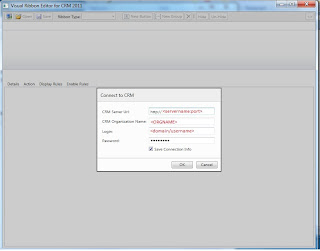
1. Connecting to the CRM server from visual ribbon editor.

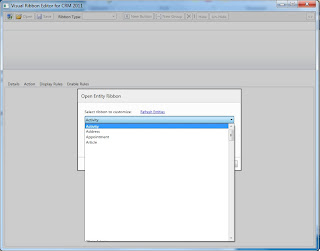
2. Click on "Open" button and select the Entity which you want to create a button.

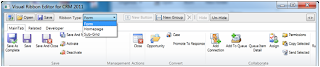
3. Now you have 3 kind of Ribbon types (Form, Homepage and Sub-Grid) in this example I'm creating button against the Homepage.

4. Click on 'New Group' and add a Group to your button

5. Select the Group and Click on "New Button" Update Lable and Id and Select the icon as well.


Ok Now you ready to Go.

Click on Save button. it will save and publish your changes to the CRM.

Now we need to add action to that button click.

Create a web resource and Add a javascript function ex: updateRecordStatus

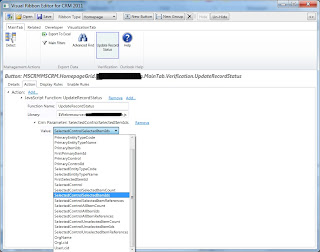
what this function does is it simply call WCF method to update the record status. Here I'm not going to focus on WCF method.

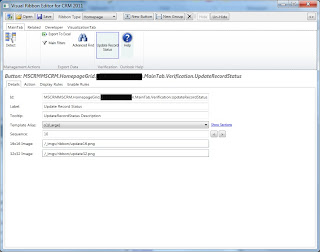
As you can see in the below image we can specify CRM parameters. Here I'm selecting "Selec

tedControlSelectedItemIds" parameter. This will pass whatever the selected records to the javascript method. Then we can use AJAX to send those IDs to the WCF web service and show the response to the user.

function UpdateRecordStatus(recordIds) {
if (recordIds!= null && recordIds!= "") {
var _serviceUrl = '/ISV/SERVICE/Service.svc/json/UpdateRecordStatus';
var _data = '{"Ids": "' + recordIds + '"}';
$.ajax({
type: "POST",
url: _serviceUrl,
data: _data,
contentType: "application/json",
dataType: "json",
cache: false,
async: false,
success: function (response) {
alert("Selected records are updated successfully ")
},
error: function (response) {
alert(response.responseText);
}
});
}
}

Tuesday, March 6, 2012

How to pass current view id to Custom web page through ribbon button in CRM 2011

In my recent project I wanted to get all the records which are in current view and do some processing and display those records in a custom web page.

My Approach

1. Get the selected View id
2. pass it to the custom web page as query string through ribbon button.
function LoadRecords() {
var selectedViewId = document.getElementsByTagName("span");

var el = getElementsByAttribute("span", "currentview");
var viewId = el[0].id;

var UserID = GetCurrentUserID();
var sUrl = '/ISV/myCustomPage.aspx?crmuserid=' + UserID + '&amp;viewid=' + viewId;
var sWin = window.open(sUrl, '', 'height=750 ,width=900, left=75, top=50 ,toolbar=no,directories=no,status=no,menubar=no,scrollbars=yes,resizable=yes,modal=yes');
}

function getElementsByAttribute(strTagName, strAttributeName) {
var arrElements = document.getElementsByTagName(strTagName);

var arrReturnElements = new Array();
var oCurrent;
var oAttribute;
for (var i = 0; i < arrElements.length; i++) {
oCurrent = arrElements[i];

oAttribute = oCurrent.getAttribute && oCurrent.getAttribute(strAttributeName);
if (typeof oAttribute == "string" && oAttribute.length > 0) {
arrReturnElements.push(oAttribute);
}
}
return arrReturnElements;
}

3. get the selected view from SavedQuery table
public SavedQuery GetSavedQueryById(Guid viewId)
{
SavedQuery savedQuery = null;
if (!viewId.Equals(Guid.Empty))
{
savedQuery = (SavedQuery)service.Retrieve(SavedQuery.EntityLogicalName, viewId, new ColumnSet(true));
}
return savedQuery;
}

4. extract the conditions for selected view from FetchXml column

private Dictionary<string, string> getCoditionListForSelectedView(string selectedView)
{
try
{
Dictionary<string, string; condList = new Dictionary<string, string>();
commonFacadecs = new CommonFacade();
string fetchXML = commonFacadecs.GetSavedQueryById(viewId).FetchXml.ToString();

string formattedXML = XElement.Parse(fetchXML).ToString();

XmlDocument xmlDoc = new XmlDocument();
xmlDoc.LoadXml(formattedXML);
XmlNodeList nodeList = xmlDoc.SelectNodes("/entity");
XmlNodeList nodeList2 = xmlDoc.GetElementsByTagName("condition");

for (int i = 0; i &lt; nodeList2.Count; i++)
{
XmlAttributeCollection xmlAttrc = nodeList2[i].Attributes;
string name = xmlAttrc[0].Value;
string oper = xmlAttrc[1].Value;
string Value = xmlAttrc[2].Value;
condList.Add(oper, Value);
}
return condList;
}
catch (Exception exception)
{
throw
}
}

5.Retrieve records according to the filter condition

Results

Above approach will give you the all the records which are coming from the selected view
then you can do whatever the processing and display it in custom web page.

Tuesday, February 28, 2012

Using SetStateRequest to deactivate Contact record.

Recently I wintered to deactivate contact entity for some scenarios. below is the piece of code which I used to do it so.


public void DeactivateContact(Guid contactId)
{
try
{
SetStateRequest setStateRequest = new SetStateRequest();
setStateRequest.State = new OptionSetValue(0);
setStateRequest.Status = new OptionSetValue(1);
setStateRequest.EntityMoniker = new EntityReference(Contact.EntityLogicalName, contactId);

service.Execute(setStateRequest);
}
catch (Exception exception)
{
throw exception;
}
}

Monday, February 27, 2012

Visual Ribbon Editor for MS CRM 2011

In CRM 2011 Editing ribbon is a very hard thing. because we have to change lot of xml files. But Visual Ribbon Editor is a wonderful tool which will enable you to edit CRM ribbon more easily, definitely it will make your life more easier .

You can download it from codeplex

Sunday, February 26, 2012

Reload CRM 2011 sub-grid manually

Recently I wanted to add a subgrid to the one of my CRM form. It's a simple thing you just want to follow the normal procedure.

1. Settings - Customizations - Customize the System

2. Open the entity form and go to the Insert tab and click on Sub-Grid button


3. Now give a name for "Name" field then select Entity and Default View
ntity form and go to the Insert tab and click on Sub-Grid button

That's it. Save and publish the form.

Normally now all of the sub records should populate in the main form load. But in my case it didn't load the sub grid records, so just had to find a reason for that. actually in my main CRM form there were more than 10 sub grids. Finally I came to know that it will load only first 5 sub grids in the page load. So then we need to manually load my sub grid using javascript. It was not that much default you can simply use the following javascript code.


var grid = document.getElementById("SubGridName");
if (grid != null) {
if (grid.readyState == "complete") {
grid.Refresh();
}
}

MS CRM 2011 KB Article customization Issue.

Recently I have encountered some issue while customizing Kb Article Entity. I was doing following configuration in Article form. 1. Add Ba...